A tambola night, also called a housie night, needs a host more than it needs luck: someone who gets the tickets out, keeps a steady pace, and settles every claim fairly and quickly. With the phone as caller, most of that work is done for you. It draws the numbers, says them aloud, keeps the board, and checks every claim against the numbers called. This guide covers what the host still decides, in the order of an evening: before the night, during it, and with a big or remote group. For the rules themselves, see the tambola rules guide.
What you will learn
- How to prepare tickets, and why the sheet code matters
- Who should call, and where the phone should be
- How fast to call, and when to use the voice
- How to check a claim in a few seconds, and how to handle a bogey
- How to run the game for an office, a society hall or an online room
- The mistakes that slow an evening down
Before the night
Count your players and tickets
Decide who plays with a named seat. On one device, up to twelve people can be named players, one ticket each, and the game names them in every claim. Everyone else plays an extra ticket: add them under More options in strips of six, up to 300 tickets in all. A family of five needs nothing more than five names; an office of forty needs a few named players and five strips of extra tickets.
Print the tickets, and keep the code
Use Print tickets in the setup. It prints every ticket of the game six to a page, each with its code, and tells you how many pages that is. Print only the named players’ tickets, or a run of strips, if that is all you need.
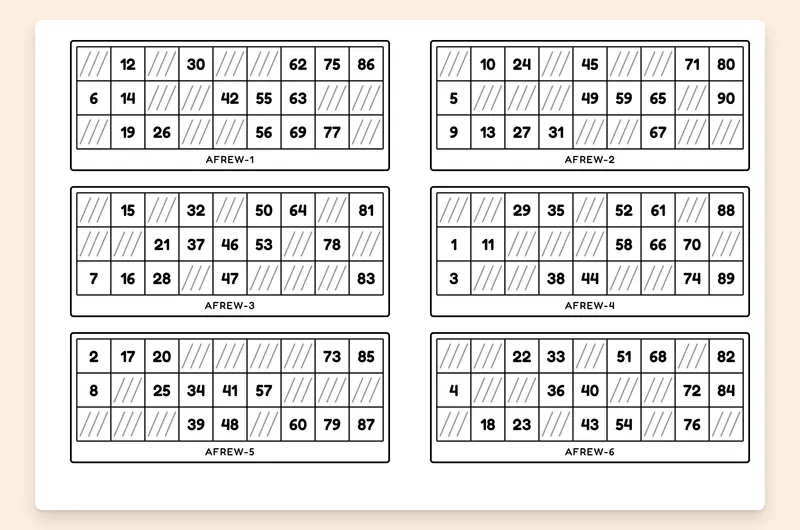
A printed strip of six from sheet AFREW. Between them, the six tickets hold every number from 1 to 90 exactly once.
The most useful thing on the page is the sheet code, five letters and digits printed with the tickets. Write it down. Type it into the setup and the same tickets come back: you can print the tickets in the afternoon, set the game up in the evening, and play the same tickets again next week. Because every set of six tickets is a strip, a group that plays tickets 1 to 6 has every number covered: each call is good news for exactly one of them.
For up to four players at one table, there is another way: choose On this phone and each ticket is drawn on the screen for players to tap as numbers come up. It suits a small family game; for anything bigger, print.
Choose who calls
The host needs one hand free for the phone and one eye on the room. Put the phone where the caller can reach it and, ideally, where everyone can see the board of called numbers: on a stand at the front, or on a television through screen sharing. The board shows every number called, the latest ringed, so players who were busy marking can catch up without asking.
Pick the claims and the pace
The standard claims are Early five, Top line, Middle line, Bottom line, Four corners and Full House. For a shorter evening, or with young children, choose Lines and Full House only. Decide whether one or two players can win Full House: two keeps the game going a little after the first Full House.
During the night
Set a steady pace
Tapping Next number yourself gives the most control: you can wait while someone hunts for a number or tells a story. Automatic calls, every 5, 10 or 15 seconds, keep a big room moving and let you join in. At 10 seconds, a four-player game runs about 80 calls before a Full House is possible, about 13 to 14 minutes of calling. Pause stops the clock for a claim; Resume starts it again.
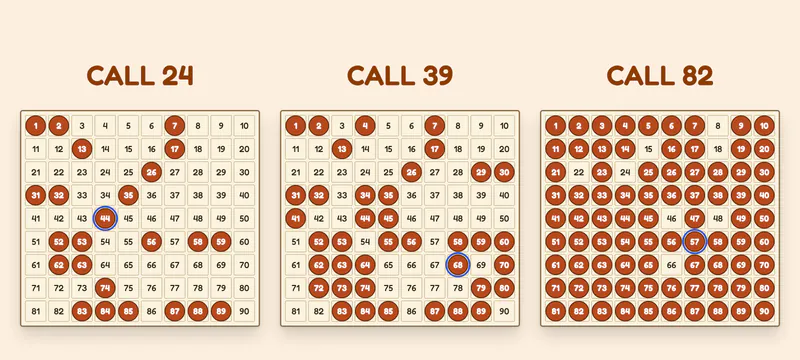
One game for four, three moments. After call 24 someone could claim Early five; after call 39 someone has a full line; after call 82 a ticket is complete.
Let the voice help
Call numbers aloud, on by default in the More menu, says each number and then its digits: “Fifty-nine. Five, nine.” The digits help in a noisy room, where fifteen and fifty are easy to mix up. It works where the device has a voice, so test it before the guests arrive, and turn the volume up. If the room is loud, say the number yourself as well.
Check claims quickly and fairly
When a player calls out a claim, pause the calls if they are automatic and tap Claim. Choose who is claiming, or type an extra ticket’s number or code in Another ticket, choose the claim and tap Check. The answer comes at once, with the ticket drawn and its called numbers marked:
- Valid: the claim is theirs. Announce it, and carry on.
- Valid, shared: someone else won it on this same number; they share it. Both score a point.
- Too late: the claim was won on an earlier number. No penalty, and nothing to argue about.
- Bogey: some numbers are missing, and the phone lists them. That player can’t try that claim again, but keeps everything else.
Try checking a claim the way the phone does:
Your move: check the claim
Checking a claim
You are Player 1. The ringed numbers on your ticket have been called. Which claims can you make?
Tap a claim under the ticket to check it.
Two habits keep claims friendly. First, check every claim on the phone, even an obvious one: then nobody’s ticket is checked by eye and nobody else’s isn’t. Second, read the answer out, including a bogey’s missing numbers, so the room hears why. “Easy to do in the excitement” is the phone’s own advice on a bogey, and a good line for the host too.
End the game
When Full House is won, the phone stops calling. Wait a moment in case someone else had it on the same number, then tap End game. The result lists every claim and who won it, and each claim won is a point added up over rematches, so a series of games makes a natural evening.
Big groups and remote groups
An office or a society hall
Print the tickets in advance with enough extra strips, number them clearly, and hand them out at the door with a pen. Name a few players if you like, such as the organizers or a table captain; everyone else claims by ticket number. Put the caller on a projector or a large screen, use automatic calls at 10 or 15 seconds, and keep the voice on through the room’s speakers if you can. One helper can stand by the phone to enter claims while the host keeps the room going. If nearly everyone has a phone, an online room works in a hall too: put the caller’s screen on the projector, let people claim from their own phones, and print extra tickets only for those without one.
An online room
When the players are in different places, a family across cities or a team working from home, use a room. Play Tambola online with friends: you open the room, send the link or the code, and everyone who joins before Start gets a ticket on their own phone, up to 50 people, you included. There is nothing to print or send.
- Choose an interval. Every 10 or 15 seconds gives people on a slow connection time to mark, and the calls keep coming even if your phone goes to sleep. Pause when someone needs a minute, and Resume.
- Wait for the last name. Anyone who arrives after Start watches that game and gets a ticket in the next one, so give a latecomer a minute before you start.
- Let players claim for themselves. Under each ticket there is a button for every claim, and the answer goes back to that phone while everyone else sees a short notice. Nobody can claim for someone else.
- Keep printed tickets for people without a phone, such as a grandparent sitting next to you: add extra tickets in the lobby, under More options, and claim for them by ticket number.
A video call beside the room is still good for the cheering, but nobody needs to share a screen or read out a ticket code. When the last Full House is won, the calling stops and the game ends by itself 20 seconds later.
Common mistakes
- Losing the sheet code. Without it, nobody can check a printed ticket another day. Write it on the first page.
- Calling too fast for the room. If people keep asking for the last number, slow down or switch to tapping.
- Checking claims by eye. Use the claim sheet every time; it is quicker than reading a ticket aloud and nobody can dispute it.
- Forgetting to pause. With automatic calls, a number called during a claim can make a shared claim impossible.
- Mixing sheets. Tickets from two different sheet codes can’t both be checked in one game: print every ticket from the same code.
A checklist for the night
- Tickets printed from one sheet code, the code written down
- Named players typed in, extra strips added for everyone else
- Claims, Full House winners and call speed chosen
- The voice tested, the volume up, the screen where everyone can see it
- A pen per player, and a helper for claims in a big room
When you are ready, open the tambola caller and call the first number.