Snakes and Ladders on your own devices
Snakes and ladders is all luck, so when the players are in different places the roll has to be the same for everyone. In an online room our server rolls the die and every phone shows the same number, then the counter climbs or slides on every screen at once. Up to 6 players can join with a link or a 6-character code, and the host sets the house rules: an exact roll to finish (on unless switched off) and an extra roll on a 6.
Free for 2–6 players, each on your own phone, tablet or computer. Share a link or a 6-character code; nobody needs an account or a download.
How to play snakes and ladders online with friends
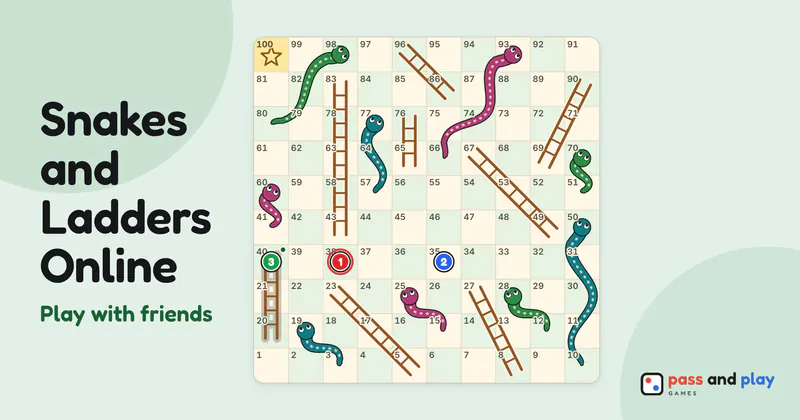
A multiplayer snakes and ladders room opens with two seats. The host adds more with Number of players, up to six, and friends take the seats in the order they open the link. Each counter is a colored token with its player’s seat number printed on it, so even two similar colors on a small screen are easy to tell apart. Anyone who arrives once every seat is taken can still join and watch the race.
With two players, the lobby has a Who goes first choice for the host. The two house rules, exact roll to finish and extra roll on 6, sit in the lobby where every phone can see them, and they can’t be changed once the race is running. Settle them while everyone is still joining. A rematch keeps the same house rules, so you only argue about them once.
Rolling on separate phones
Snakes and ladders has no decisions, so a turn online is a single tap: the Roll button shows only on the phone of the player whose turn it is. Everyone else’s bar names who should roll, as in “Riya: roll the die”, and nobody can roll on someone else’s behalf. Each badge shows the square that player’s counter is on, which makes it easy to see who is closest to 100 without counting along the board.
The race ends the moment one counter reaches 100. The result names the winner and lists where everyone else got to, square by square. The host’s Rematch starts a new race in the same room, the first roll moves on to the next player, and the wins carry over.
Nothing hurries a roll, so a child who wanders off for a snack simply leaves the race paused at their turn. A tablet that drops off the Wi-Fi keeps its counter on the board, and the others see a note saying so. If the parent who created the room loses signal for a minute, hosting passes to another player who is still connected, and the rest of the family can keep rolling.
Tips for a family race on different phones
- Let grandparents type the code. Room codes are six characters with no I, L, O, 0 or 1, the dash is optional, and lower case works too, so reading it out over the phone is easy. The link is quicker for anyone who can tap it in a family group chat.
- Shorter races for small children. Switching off Exact roll to finish means nobody sits on 97 waiting for exactly a 3. Extra roll on 6 speeds things up as well.
- Keep a video call open alongside. Nobody can type or talk inside the room, and a long snake is much funnier when you can see the faces. A snake and ladder game played over a call feels closer to sitting round one board.
- Run a little tournament. Rematch keeps the score for the room, so a few races in a row show who had the luckiest evening.
The snakes and ladders rules explain the board and the house rules, and how to play snakes and ladders with kids adds variants for young players. Sharing one tablet, or need computer players to fill the board? Play Snakes and Ladders on one device. The game is far older than any app: the history of snakes and ladders goes back to Moksha Patam.
Rooms are private and close by themselves after the game; the server keeps a room’s names and moves only while it is open. See the privacy policy for the details.