Matching Pairs looks like a game of pure luck, but good players find far more pairs than beginners, and it isn’t because they have a special memory. They choose their tiles in a smart order, never give away information for nothing, and use a few simple tricks to remember where pictures are. This tutorial explains those habits, walks through a turn-by-turn example, and shows how to play against each computer level. If you need the rules first, start with the Matching Pairs rules.
What you will learn
- Which tile to turn over first, and why it should be one you have never seen
- What to do with your second tile when the first one is new
- Simple ways to remember where each picture is
- Why the other players’ turns matter as much as yours
- How the end of the game works, when the last pairs give themselves away
- How each computer level plays, and how to beat it
Your first game, step by step
Start a game on the 4×4 grid with Shapes against the computer on Easy. It has 16 tiles and 8 pairs.
- Your first turn. You know nothing yet, so any tile is as good as another. Turn over the top left corner: a star. Then turn over another tile you haven’t seen, say the one next to it: a moon. No match. Both turn back, but you now know two things: the star is in the top left corner and the moon is next to it.
- The computer’s turn. It turns over a tile in the bottom row: a circle, then one in the middle: a moon. No match. Now you know where both moons are.
- Your second turn. Take the moons first! You know both halves, so turn over the moon next to the corner and the one in the middle. The pair is yours, and you go again.
- Your extra turn. Now turn over an unknown tile: a circle. You remember the circle in the bottom row, so turn that over for your second pair. Go again.
- Keep going with the same order every turn: a known pair first, then an unknown tile, then its match if you know it, otherwise another unknown tile.
Notice what made the difference: you watched the computer’s turn as closely as your own, and you never spent a tile on something you already knew.
Try the tips on a small board
Turns 0Pairs 0 of 4
Turn over two tiles. A pair stays face up, and you go again.
Strategy tips that win games
1. Take every pair you know about first
Before you touch anything, ask: do I know where both halves of a picture are? If yes, take that pair at once. Every turn you wait gives the other players a chance to take it, and in the standard rules a pair also earns you another turn.
2. Turn over an unknown tile first
When you don’t know a whole pair, start with a tile you have never seen. If its picture matches one you remember, you take a pair. If you started with a tile you already knew instead, you would learn nothing new and only have one guess left to find its match.
3. Never waste your second tile
Suppose your first tile is new and you don’t know where its match is. Your second tile should usually be another unknown tile. It has a chance of matching, and it shows you a picture you haven’t seen yet. Turning over a tile you already know has no chance of a match and teaches you nothing, so it throws your turn away.
There is one honest drawback: everything you turn over, your opponent sees too. Against a strong memory, each new tile you show also helps them. That is why remembering more than your opponent matters so much: the information is shared, but only the player who keeps it gets the pairs.
4. Anchor pictures to places
Memory works better with a place and a name than with a picture alone. Try these:
- Use the edges. Corners and the outside rows are easier to remember than the middle. Say “star, top left corner” in your head.
- Count along the row. “Moon, third in the bottom row” is easier to recall than “moon, somewhere near the bottom”.
- Make a little story. “The moon is next to the star” or “the circle is under the cloud” links two tiles together, so remembering one brings back the other.
- Say it quietly. Naming a picture as it turns over helps young players a lot, and it works for adults too.
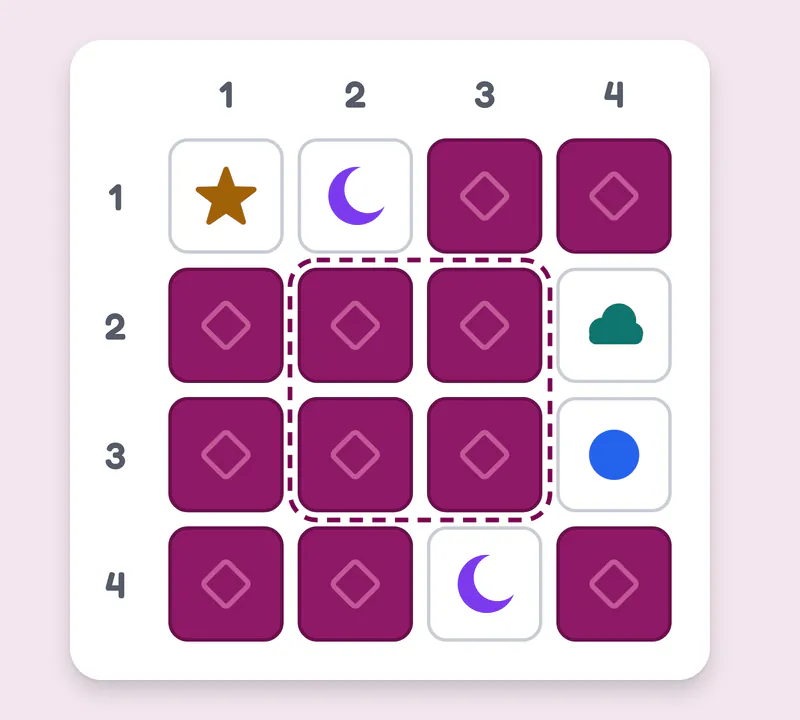
Five tiles you have seen, each in a place you can name: the star in the top left corner, a moon next to it, a cloud on the right edge with a circle under it, and the other moon third in the bottom row. That makes the two moons a pair you know, so take them first. The middle four tiles, inside the dashed line, are the ones people forget first.
5. Watch every turn, not just yours
Half the pictures you see in a two-player game are turned over by your opponent. Players who look away during the other person’s turn throw that information away. The game holds two tiles face up for a moment after a miss; use that moment to fix both pictures in your head.
6. Count what is left near the end
As the grid empties, the remaining tiles give themselves away. When only a few pairs are left, most of the face-down tiles have been seen at least once. Count them: if four tiles are left and you know three of them, two of those three are a pair, and the fourth tile is the twin of the third. On the last two tiles, the pair is guaranteed.
7. Start small and grow
On 4×3 a careful player can remember almost everything, so it is a good grid to build the habits above. Move to 4×4 when you can clear 4×3 in about eight turns, and try 6×5 when 4×4 feels easy. Playing alone, the game keeps your best for each grid, which is a fair way to see yourself improve.
Playing against each computer level
The computer never sees a face-down tile. It only knows what has been turned over during the game, and the level decides how much of that it remembers.
- Easy only remembers a few of the last tiles shown, and often forgets even those. It also sometimes turns over a tile it already knows as its second tile. Take your pairs quickly and you will usually win. A good level for young children.
- Medium remembers most of the recent tiles but loses track of older ones. It takes the pairs it remembers and doesn’t waste its second tile. Beat it by remembering the tiles from early in the game, which it is most likely to have forgotten.
- Hard remembers every tile that has been shown. It takes every pair whose two halves have appeared, so you can’t leave a known pair lying around. To beat it, take every pair you know as soon as it is your turn, follow tips 2 and 3 strictly, and hope for a little luck with the unknown tiles. Even perfect players lose some games against it, because nobody controls where the pictures were dealt.
Common beginner mistakes
- Starting with a known tile. It throws away the chance of a free match.
- Turning over a known tile second. It can’t match and teaches you nothing.
- Looking away during other turns. Half the information goes to waste.
- Trying to remember everything. Remember fewer tiles, but well: the most recent ones and the ones on the edges.
- Leaving a known pair for later. The other player may take it on the very next turn.
A practice plan
- Play alone on 4×3 until you can clear it in about eight turns.
- Play 4×4 against Easy, saying each picture and its place out loud.
- Move to Medium and try to win by remembering the early tiles it forgets.
- Play 6×5 alone and try to beat your best each time.
- When you can beat Medium on 6×5, take on Hard.
Ready? Play Matching Pairs now, check the full rules if anything is unclear, or try Hangman for another game that rewards a good memory for letters.