Matching Pairs is a memory game for one or more players. A grid of tiles lies face down, and every picture appears on exactly two tiles. On your turn you turn over two tiles. If they match, you keep the pair and go again; if they don’t, both are turned back and play passes on. When every pair has been found, the player with the most pairs wins. This guide explains each rule in detail, the grid sizes, ties, playing alone, the One Flip variant and the card version, and the exact rules the game on this site uses.
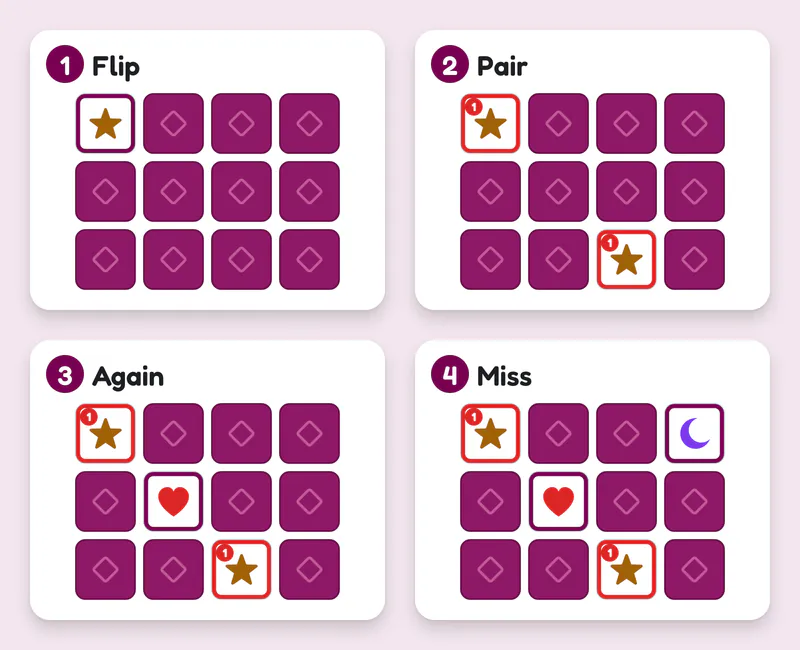
A turn in four pictures. 1: turn over any tile, here a star. 2: the second tile is the other star, so the pair is yours, marked with your colour and number, and you go again. 3: you turn over a heart. 4: the second tile is a moon, not a heart, so both turn face down again in the same places and the next player’s turn begins.
Overview
- Players: 1 to 4 on this site (two is the classic game; on a table with cards, more can join)
- Time: 2 to 4 minutes on a 4×4 grid, 5 to 8 minutes on 6×5
- Ages: from about 3 with a small grid. There is nothing to read and nothing to count.
- Equipment: a set of picture tiles or cards with every picture twice, a pack of playing cards, or this page
The game is known under many names: the memory game, the matching game, or simply Pairs. Families play it with a deck of playing cards as well as with picture sets made for children. On this site it is played on a grid of picture tiles. Two tiles with the same picture make a pair, and nothing else counts as a match.
Setting up
On this site the setup panel asks three things:
- Who plays. One player plays alone. Two players choose With a friend or vs Computer. With three or four players, each seat can be a person or the computer.
- The grid. 4×3 has 12 tiles (6 pairs), 4×4 has 16 tiles (8 pairs, the default) and 6×5 has 30 tiles (15 pairs).
- The pictures. Shapes gives fifteen pictures that each have a different outline: a circle, a square, a triangle, a star, a moon, a cloud and so on, each in its own colour. Numbers uses the numbers 1 to 15, and Animals fifteen animal silhouettes, from a cat and a dog to a snail, an owl and a whale. The smaller grids use a random choice of the fifteen pictures each game.
Press Start and the tiles are shuffled and dealt face down. The deal is random and nobody, not even the computer, knows where anything is.
Playing with cards or tiles at home
Shuffle the cards and lay them face down in neat rows, so each one keeps its place for the whole game. A rectangle is easiest to remember: 4 rows of 4, or 5 rows of 6. Leave a little space between cards so you can turn one over without moving its neighbours. Choose who goes first; the youngest player often does.
Objective
Collect more pairs than any other player. Playing alone, find every pair in as few turns as you can.
How a turn works
- Turn over one tile. Tap any face-down tile. Its picture is now shown to everyone.
- Turn over a second tile. Tap another face-down tile.
- Compare.
- A match: the two pictures are the same. The pair is yours. On this site both tiles stay face up with your colour around them and your player number in the corner, and you start another turn straight away.
- No match: the two pictures are different. Everyone gets a moment to see both, then they turn face down again in the same places. Your turn is over.
- Play passes to the next player, who starts again at step 1.
A turn is always exactly two tiles. You can’t stop after one, and you can’t turn over a third tile before the first two are dealt with.
Try it: find the four pairs
Turns 0Pairs 0 of 4
Turn over two tiles. A pair stays face up, and you go again.
The rules in detail
Turning over tiles
Both tiles must be face down when you choose them. A pair that has been won is out of play, and you can’t choose the tile you have just turned over as your second. Every tile turned over is shown to all players, so on one phone nothing has to be hidden: the phone can lie on the table between everyone.
A match and the extra turn
Two tiles with the same picture make a pair. The player who turned them over keeps them, and in the standard rules takes another turn. There is no limit: a player with a good memory can find three or four pairs in a row, and an early run of pairs can decide a game.
No match
When the pictures differ, both tiles are turned back face down in exactly the same places. They are never moved or shuffled again during the game. That is the whole point: everyone has now seen two more pictures, and the next player may be able to use them.
Ending the game and scoring
The game ends the moment the last pair is taken. Each player counts their pairs, and the highest total wins. On this site the pair count sits in each player’s badge during the game and is shown again in the result.
Ties
Players with the same top score share the win. With two players this can happen on 4×3 (3 pairs each) and 4×4 (4 pairs each). The 6×5 grid has an odd number of pairs, so two players can’t tie there, but three or four players can.
Turn order with three or four players
Turns go round the table in seat order. A player who finds a pair keeps the turn until they miss; then it passes to the next seat. On this site two players choose who starts in the setup, and each Rematch moves the first turn to the next player.
Grid sizes
| Grid | Tiles | Pairs | Good for |
|---|---|---|---|
| 4×3 | 12 | 6 | Young children, a very quick game |
| 4×4 | 16 | 8 | Family games and first games against the computer |
| 6×5 | 30 | 15 | Older children and adults, a real memory test |
A bigger grid doesn’t just take longer; it changes the game. On 4×3 a careful player can remember nearly everything. On 6×5 nobody remembers everything, and the player who tracks the most tiles usually wins.
Playing alone
With one player there is no opponent, so the score is the number of turns you need. Every two tiles you turn over count as one turn, whether they match or not. The best possible game is one turn per pair, which only happens with luck. On this site your best for each grid and picture set is kept in this browser on your device, and the result tells you when you have beaten it.
Variants and house rules
One Flip (no extra turn)
In this variant every turn is exactly two tiles: a match is kept, but play passes on anyway. Turns are shorter and more even, so a lucky early run counts for less. On this site, switch off Extra turn after a match under More options.
The card version
With a standard deck of playing cards, lay the cards face down and play exactly the same way. Two cards of the same rank make a pair, such as two kings or two sevens. Many families make it harder by asking for the same rank and the same colour, so the seven of diamonds only matches the seven of hearts. A full deck gives 26 pairs, which takes a long time; for a family game, use only some of the ranks.
Timed and team play
Some families play with a timer for each turn, or in teams that share one score. Neither changes how a match works, and the site keeps the standard turn without a clock.
Which rules this site uses
The site plays the standard rules on a grid of pictures: two tiles a turn, a match keeps the turn (unless One Flip is on), a miss turns both tiles back in place, the most pairs wins and equal pairs share the win. Playing alone, the score is the number of turns. Undo is switched off: taking back a move after a tile has been seen would give a free look at it. Restart deals a fresh grid instead.
Two people on one phone
Because every tile is shown to everyone, Matching Pairs needs no hand-off and no hidden screen, so it suits one phone well. Lay the phone flat between you, set the brightness so everyone can see, and take turns tapping. The bar at the top says whose turn it is, and when two tiles don’t match the game holds them face up for a moment so both players can see them before they turn back.
Common mistakes and rule disputes
- Turning over a tile you already know as your second tile. It isn’t against the rules, but it wastes the turn’s chance of a lucky match. Turn over an unknown tile instead.
- Moving tiles after a miss. Tiles go back in exactly the same place. A tile that has been moved is the same as a new deal for everyone’s memory.
- Peeking. You may not lift a tile to look and put it back. Every tile you touch is one of your two flips.
- Forgetting the extra turn. In the standard rules a match is followed by another turn. Agree before the game if you are playing One Flip.
- Counting a near match. Only two identical pictures count. On this site that is decided for you.
Glossary
- Pair: two tiles with the same picture.
- Flip: turning a tile face up. A turn is two flips.
- Miss: a turn whose two tiles don’t match; both turn back face down.
- Extra turn: the turn you get after finding a pair, in the standard rules.
- One Flip: the variant without the extra turn.
- Known tile: a face-down tile whose picture has already been shown.
Play it now
You can play Matching Pairs right now, free, on this page’s game: alone, with a friend on one phone, with up to four people, or against the computer on Easy, Medium or Hard. For tips on remembering more tiles and taking more pairs, read how to win Matching Pairs. If you enjoy quick games for the whole family, see our games for kids and family games, or try Hangman next.