Backgammon on your own devices
An online room is a private backgammon table: only someone with your link or 6-character code can sit down, and neither of you needs an account. Our server rolls both dice and both screens show the same roll. Hitting, the bar and bearing off follow the same rules as our one-device backgammon, and the board only offers legal moves.
Free for 2 players, each on your own phone, tablet or computer. Share a link or a 6-character code; nobody needs an account or a download.
How to play backgammon online with friends
The room is a private multiplayer table for two: the host plays White and the friend who opens the invite link plays Black. There is nothing to set in the lobby: this is standard backgammon without the doubling cube, so once both seats show a name, the host taps Start. Nobody picks who goes first either. The game begins with the opening roll, one die for each player, rolled again on a tie, and the higher die moves first using both numbers. Our server throws those dice too, so the start is as fair as every roll after it.
Backgammon is a game for two, so a third person who opens the link joins as a watcher. They see every roll and every checker move, which makes the room a quiet way to follow a friend’s game.
A backgammon game on two screens
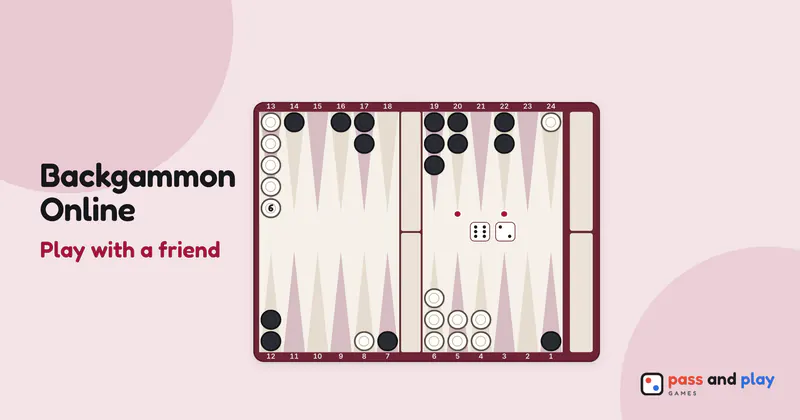
Each player sees the board from their own side. Your side of the board is at the bottom of your screen, and the points are numbered from your point of view, so a move such as 13/7 means the same thing to you as it would at a real table. Watchers see White’s side. That way neither of you has to count points backwards on someone else’s layout.
The Roll button only lights up on your phone when it is your turn, and your friend watches the same two dice land on their screen. On a phone, tap twice to move is on: the first tap on a point shows where your checker would go, and a second tap, or the Move button, plays it. Points are narrow on a phone, and a move online is final once it is played, so the second tap is worth it. You can switch it off under Tap twice to move in the More menu.
The pip count sits under each name, and once a game has been won, each badge also shows the match points for the room: 1 for a single game, 2 for a gammon and 3 for a backgammon. The result screen adds the points up and shows games won beside them, and Rematch keeps both running.
Tips for backgammon with a friend far away
- Keep a call going. The table itself is silent, and backgammon has a lot of “how did you roll that?” in it. A phone call or a message thread alongside is where that belongs.
- Keep the page open during a long session. Match points are worked out on each screen. If a phone reloads the page partway through, the games before the reload still count, but as one point per win, so an earlier gammon would shrink to a single point.
- Take a break mid-game if you need one. There is no turn timer, so you can both put your phones down; the room holds the position, and each phone reconnects as soon as you come back to the tab.
- Use a bigger screen if you have one. The tap-twice step is only for phone-sized screens. On most tablets and laptops, a single tap moves a checker, which makes a long bear-off quicker.
The backgammon rules cover the board setup, bearing off and scoring gammons, and the beginner backgammon tutorial covers openings, priming and safe play. For two people on one screen, or a game against the computer, play backgammon on one device. Backgammon is also one of our dice games for family night.
Rooms are private and close by themselves after the game; the server keeps a room’s names and moves only while it is open. See the privacy policy for the details.