Business Tycoon is a free online version of the Business board game for 2 to 6 players: a property trading game where you roll two dice, move round a board of 28 or 36 spaces, buy the places you land on and collect rent from everyone who lands on them after you. Own every place of a set and you can build homes there, then a tower, and watch the rent climb. Trade with the other players to complete your sets, keep enough cash for the rents ahead, and finish as the richest player. In India this family of games is simply called Business, and elsewhere people look for a free Monopoly alternative: this is our own version, with our own boards, names and numbers, not connected with Hasbro, which owns the Monopoly name. Nothing to install, no sign-up, and it works offline after your first visit.
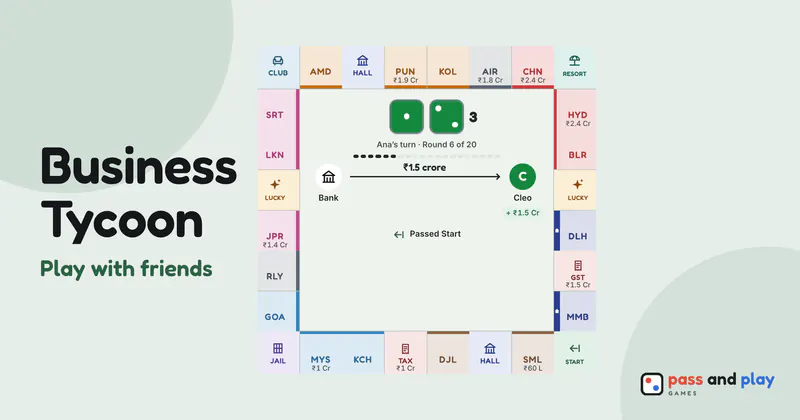
How to play Business Tycoon
- Everyone starts on Start with the same cash. Each time you pass Start you collect your salary.
- On your turn, roll the two dice and move clockwise. Doubles roll again.
- Land on a free place and choose Buy or Pass; if you can’t afford it, the roll passes on it for you. Land on someone else’s and you pay rent.
- Own a whole set and its rent doubles. Then build homes on it, evenly, up to four homes and a tower.
- Before you roll you can build, mortgage a place for half its price, or offer a trade.
- Card spaces draw a Lucky Break or Town Hall card. Land on the Jail corner and you are in Jail; Club charges a fee and Resort is a free rest.
- Can’t pay? Sell homes and mortgage places. If that isn’t enough, you are out.
For every rule in detail, with the full rent table, read the Business game rules.
Ways to play
- 2 to 6 players on one device. Pass the phone round the table, with an optional pass screen.
- Against the computer. Any seat can be a computer player. Play alone against up to five, or fill the seats your group can’t.
- Quick or Classic. A Quick game ends after a set number of rounds (20 by default, or 10, 40 or 80, in More options) and the richest player wins, counting cash, places and homes. A Classic game goes on until only one player is left.
- Two board sizes. The 8 × 8 board has 16 places in 6 sets and 2 transport spaces; the 10 × 10 board has 22 places in 8 sets and 4. Quick starts on 8 × 8 and Classic on 10 × 10; change it under Board size in More options.
- Online with friends. Play Business Tycoon online with friends: start a room, share the link, everyone on their own device.
- Starting cash. Low, Normal or High, for a tight game or a relaxed one.
- Pot on Resort. When it is on, taxes, fines, card payments and the club fee collect on Resort for whoever lands there next.
What is special here
- Five boards, each with its own places, drawings and currency, all playing the same rules. Preview in the setup shows the picked board.
- Switch the currency on any board: play the India board in dollars or the Planets board in rupees.
- Tap any space to open its card, with its price, owner and every rent.
- Holdings in the bottom bar shows any player’s cash, places, homes and release cards.
- No Undo, as at a real table: look before you tap Buy.
- Saved after every move, so a closed tab loses nothing.
The boards
India
Indian cities from Shimla and Darjeeling to Delhi and Mumbai, with the Railway and the Airport, played in rupees. Play the India board.
United States
American cities from Memphis to New York, with a rail line and an airport, played in dollars. Play the United States board.
United Kingdom
From Blackpool and Brighton up to Edinburgh and London, with rail and the ferry, played in pounds. Play the United Kingdom board.
Australia
From Alice Springs to Melbourne and Sydney, with a ferry and an outback railway, played in Australian dollars. Play the Australia board.
Planets
A trip round the solar system, from Ceres and Pluto to Earth and the Sun, with a rocket and a space lift, played in gold. Here you build domes instead of homes, and a station instead of a tower. Play the Planets board.
Play against the computer
- Easy buys most of what it lands on, builds slowly and offers a trade now and then.
- Medium keeps cash back for rent, builds its dearest set first and offers trades for the places it needs.
- Hard weighs how often each space is landed on, builds where the other players are about to land and prices its trades with care.
Quick tips
- Get one set to three homes before spreading out: that is where rent jumps.
- A place that completes a set is worth more than its price, to you or to a rival.
- Keep cash for the dearest rent a few spaces ahead of your token.
For which sets pay back fastest, when to build and how to price a trade, read how to win the Business game. To pick a length, read how a Business game ends. For more dice and board games, try Ludo, Snakes and Ladders or Yacht Dice.