Business Tycoon on your own devices
Business Tycoon is our free version of the Business board game, the property trading game, and a free Monopoly alternative you can play online with friends: roll two dice, buy the places you land on, collect rent from everyone who visits, and build homes and towers once you hold a whole set. Online, up to six friends each play on their own phone, tablet or computer. The host picks the board (India, the United States, the United Kingdom, Australia or the Planets), its size (8 × 8 or 10 × 10), the currency, a Quick game of a set number of rounds or a Classic game to the last player standing, and the starting cash.
Our server rolls the dice and draws the cards, so every screen shows the same roll and nobody can throw again. When it is your turn, Roll, Buy and the rest appear on your screen only. A trade works across phones: you put the offer together on yours, and the player you ask sees what they give and what they get on theirs, with Accept and Decline, while everyone else watches the deal. Holdings and the log show what every player owns and what happened.
So that one quiet phone never holds up the table, the host sets a time to decide: 1, 2 or 5 minutes, or off. In the last 30 seconds every screen counts down. When the time runs out the game makes the safe choice for that player: it passes on the place, reads the card, declines the offer, raises and pays a debt, or ends the turn without a roll, and a player whose own turn runs out twice in a row is out, with their places going back to the bank.
Free for 2–6 players, each on your own phone, tablet or computer. Share a link or a 6-character code; nobody needs an account or a download.
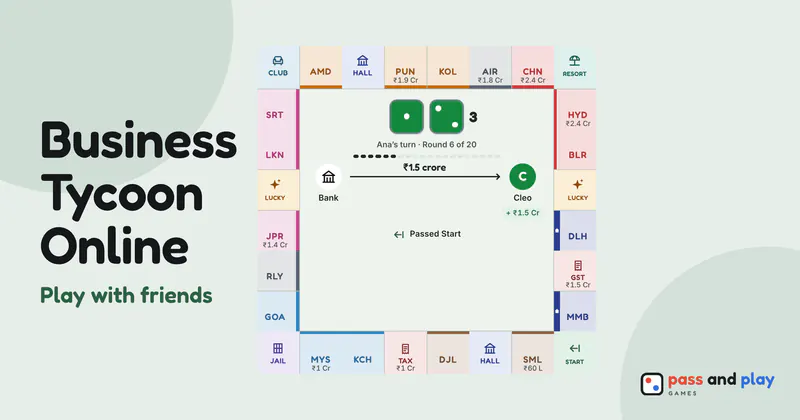
How to play the Business game online with friends
Business Tycoon is our free version of the Business board game, and a room lets friends play it together from different homes. Whoever creates the room is the host. A Business Tycoon room opens with four seats, friends fill them in the order they arrive, and the host can set any number from two to six; Start works as soon as two people are seated. Everyone else who opens the link watches the game and sees every roll. The lobby shows the host’s choices on every phone, and only the host can change them:
- Game length: Quick ends after a set number of rounds (10, 20, 40 or 80; 20 unless the host changes it) and the richest player wins; Classic has no round limit and plays on until one player is left.
- Board size: 8 × 8 (16 places in 6 sets, 2 transport spaces) or 10 × 10 (22 places in 8 sets, 4 transport spaces), under More options. Quick starts on 8 × 8 and Classic on 10 × 10; the host can change it after picking the length, and every phone shows which it is.
- Board and currency: India, the United States, the United Kingdom, Australia or the Planets, in the board’s own money or any of the others. Boards of one size have the same prices, so the currency changes only how amounts are written. Preview shows the picked board at its size.
- Time to decide: 1, 2 or 5 minutes, or off; 2 minutes unless the host changes it (more on this below).
- Starting cash and Pot on Resort, under More options.
There are no computer players in a room. To fill empty seats with the computer, use the one-device game.
A turn on separate phones
On your turn, Roll appears on your phone and nowhere else. Our server throws the dice, and every screen shows the same two dice land and your token walk round the board. Land on a free place and you choose Buy or Pass; land on someone else’s and the rent moves from your cash to theirs on every screen. Before you roll you can build homes on a whole set, mortgage a place or lift a mortgage, from Build or by tapping one of your places.
Trades happen between two phones. Tap Trade, pick a player, and choose what each side hands over: places from sets without homes, cash, or a release card. The player you asked sees your offer as “You give” and “You get”, with Accept and Decline; your screen says who you are waiting for, and everyone else sees the deal without buttons. You can make three offers a turn.
When you owe more than you have, only your phone shows Raise cash: sell homes and mortgage places until Pay lights up, or leave the game, and everything you own goes to the player you owe (or back to the bank).
When someone goes quiet
A long game shouldn’t stop because one phone went into a pocket. With Time to decide on, the game waits that long for a move. In the last 30 seconds every screen counts down, and when the time runs out the game makes the safe choice for that player and moves on. A player whose own turn runs out twice in a row is out, and their places go back to the bank; after one, every screen shows a warning. A player who drops their connection keeps their seat and can come back with the same link; if everyone in the room goes away at once, the clock waits for the first of them to return.
To stop playing on purpose, use Leave the game in More: you are out, the others play on, and you can stay in the room to watch.
Tips for a game night far apart
- Agree on the length first. A Quick game of 10 or 20 rounds suits an evening call; 40 or 80 rounds, or Classic, can run much longer. How a Business game ends compares the lengths.
- Use Holdings before you trade. It shows every player’s cash, places, homes and release cards, so you can see which set someone is one place short of.
- Talk on a call. Haggling out loud before you send an offer is half the fun.
The Business game rules cover rent, building, mortgages, Jail and both board sizes in full, and how to win the Business game explains what to buy and when to build. Want to play the computer, or share one device? Play Business Tycoon on one device instead.
Rooms are private and close by themselves after the game; the server keeps a room’s names and moves only while it is open. See the privacy policy for the details.