Running bingo used to mean a bag of balls, a board to keep track and a careful eye on every claim. With the phone as caller, the drawing, the board and the checking are done for you. What is left to the host are the choices that make a game go well: which cards, which pattern, how fast, and how to handle the moment someone shouts. This guide takes them in order, with a classroom and a family table as the examples. For the rules themselves, see the bingo rules guide.
What you will learn
- How to get cards to everyone, and why to keep the sheet code
- Which pattern suits your group and your time
- Where to put the phone and how fast to call
- How to check a claim in seconds, and what to say after a Not yet
- How to run bingo for a class, a family, a crowd or an online room
- The small mistakes that slow a game down
Before the game
Count the cards
Every named player has one card, and the game uses their name when they claim. On one device, up to twelve people can be named. For more, add extra cards under More options, in pages of four, up to 300 cards in all. An extra card has a number instead of a name, “Card 9”, and its holder claims with that number or the code printed on it.
A family of five needs only five names. A class of thirty can name the teacher’s table groups, or a single player, and give every student an extra card.
Print, and keep the code
Use Print cards in the setup. Cards come four to a page, each with its own code, and the sheet’s five-character code is on every page.
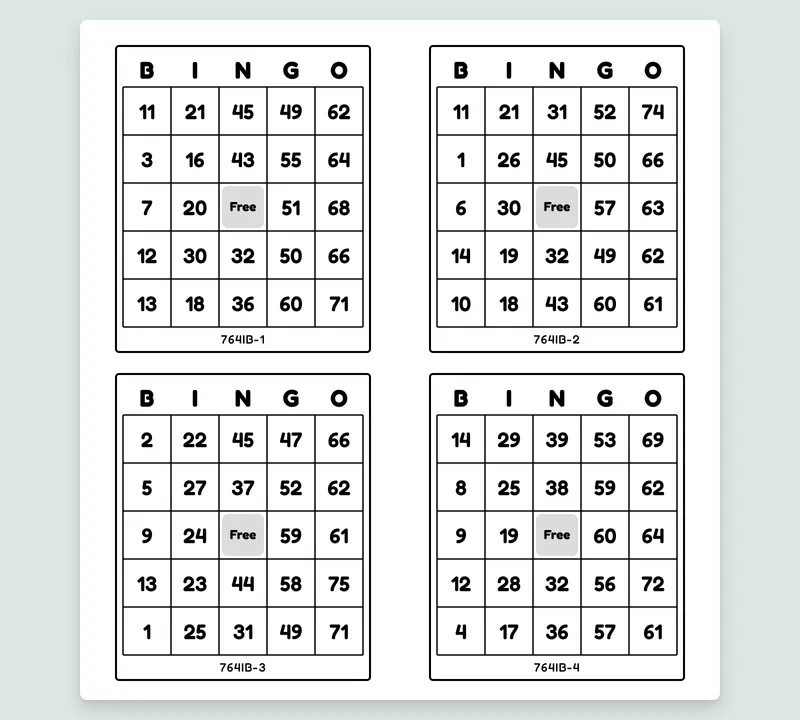
One printed page: cards 1 to 4 of sheet 764IB. Each card’s code is the sheet’s code and its number on the sheet.
Write the sheet code somewhere you will find it. Typed under Cards at another setup, it brings back the same cards, so a stack printed once serves for many games. The calls are new each game; only the cards repeat.
For up to four players sitting close together, On this phone skips the printing: the cards are drawn on the screen, and each player taps their own numbers.
Choose the pattern
The pattern sets the length of the game.
- Line, the default, is the quickest. Good for a first game or a short slot at the end of a lesson.
- Four corners and X ask for particular numbers, so players have to look at the shape, not just count.
- Blackout runs longest: a card has to have every one of its 24 numbers called.
- Line, then Blackout gives two winners in one game, the first line and then the full card.
Set Winners per pattern to 2 if you would like a second place before the game stops.
Decide who calls
The phone calls, but someone has to run it: tap Next number, open the claim sheet, end the game. On one device, that is the host, who is best off without a card of their own, so nobody can say the caller rushed to their own number. In an online room the caller holds a card like everyone else: each claim comes from the player’s own phone, and the phone judges it. Put the phone where everyone can see the big number and the board, or read the calls out yourself as well.
During the game
Set the pace
When I tap lets you wait for the slowest player at the table: call when everyone has looked. For a practiced group, calling every 10 seconds keeps things moving, and Pause stops the clock while you check a claim. Young players do better with taps than with a timer.
The board fills faster than you might expect. In this game for four, playing Line, the first line came on the 34th call:
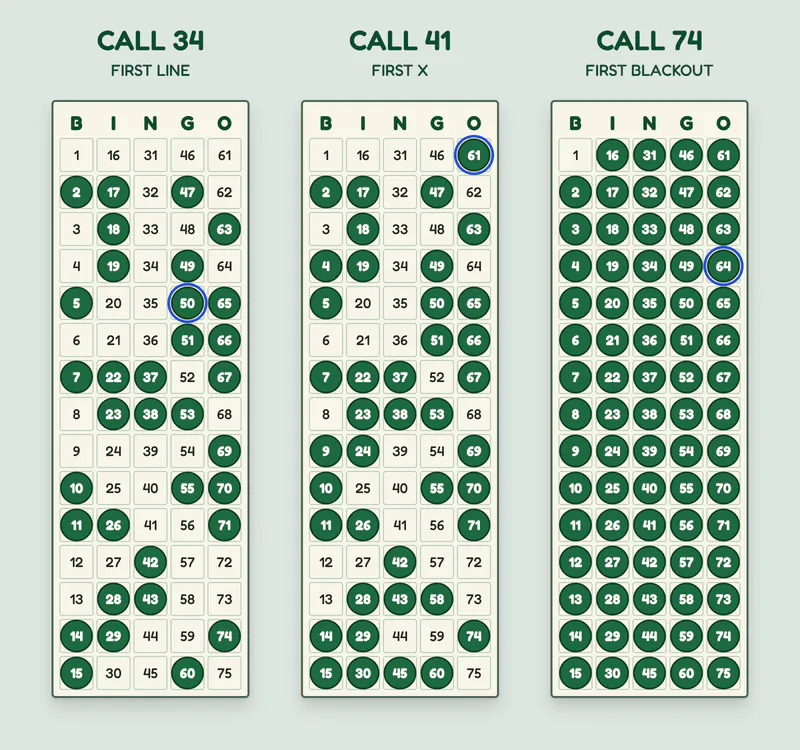
One game for four at three moments: the call that gave the table its first Line, its first X, and its first Blackout. The latest call is ringed.
Use the voice
Call numbers aloud, in the More menu, says each call: the letter, the number, then its digits, “O. Sixty-six. Six, six.” The digits settle the numbers people mix up when they only half hear them. In a noisy room, keep the voice on and say the call yourself as well.
Check claims the same way every time
When someone shouts Bingo:
- If calling is automatic, tap Pause.
- Tap Claim, choose the player, or Another card and type the card’s number or code.
- Choose the pattern and tap Check.
- Read the answer out, and turn the screen round so everyone can see the card with its called numbers marked.
The phone checks against the calls, not against what the player marked, so a card marked wrongly can still be right, and one marked fully can still be short.
Your move: check the claim
Checking a claim
You are Player 1. The ringed numbers on your card have been called, and you shout Bingo. Which patterns does your card have?
Tap a pattern under the card to check it.
After a Not yet, keep it light. The phone lists the numbers still to come and says the game goes on; the player loses only that pattern. If a second player shouts on the same number as a winner, check them too: they share the win.
Finish
Once the pattern is won, no more numbers are called. Give anyone else a moment to claim on that number, then tap End game and read out the winners.
A classroom
Bingo works as a quiet reward or a game for the last minutes of a day. Print a page of cards per four students before the lesson, with the sheet code written on the box they live in, and the same set is ready the next time. Call by tap so you can watch the room, and put the phone on the projector if you have one, so the board does the reminding.
For the youngest classes, choose Numbers: 1 to 25 (kids). Every card holds every number from 1 to 25 in a different arrangement, with no letters, so each call is on every card and every child gets to mark something.
A family table
At home, the phone can lie in the middle of the table. With four players or fewer, On this phone needs no paper at all, though printed cards let everyone hold their own. Choose Line, then Blackout for a game that has a winner early and keeps going for the rest. A family can hand out its own small prizes for each pattern, if it likes; the phone only keeps the score.
Big groups and remote groups
A party or a hall
Name up to twelve people or teams, and give everyone else an extra card. One host runs the phone, on a screen everyone can see if there is one. When a claim comes in from the floor, ask for the card’s number, type it under Another card, and read the answer out.
An online room
For a class learning from home or a family spread over a few towns, every player can have their own card on their own phone. Play Bingo online with friends: open a room, share the link or the code, and everyone who joins before Start is dealt a card, up to 50 people, you included.
- Pick an interval for a big room: calls every 10 or 15 seconds give everyone time to mark, and they keep coming if your phone sleeps. For a class, calling by tap lets you wait for the slowest reader.
- Start when the names are in. Anyone who joins after Start watches that game, with the board but no card, and gets a card in the next.
- Players claim for themselves. Each pattern has a button under the card; the answer goes back to that phone, and the room sees a short notice.
- Print extra cards only where they help, for a student without a device or a classroom watching a projector: add them in the lobby, under More options, and claim for them by card number.
The game ends by itself 20 seconds after the last pattern is won. A video call alongside is still good for seeing faces, but no screen needs to be shared.
Common mistakes
- Losing the sheet code. Without it, printed cards can’t be checked in a later game.
- Handing out a card twice. A card claims each pattern once, so two people holding copies of it can’t both win with it. Give out each card once.
- Calling too fast for the room. If people keep asking for the last number, switch to calling by tap.
- Checking by eye. Use the claim sheet: it is faster, and everyone sees the same answer.
- Ending too soon. Leave a moment after a Bingo for anyone who finished on the same number.
A checklist for the game
- Count the players and extra cards, and print the sheet
- Write down the sheet code
- Pick the pattern and the pace
- Put the phone where everyone can see it, voice on
- Pause, Claim, Check, and show the card
When you are ready, start a game of Bingo.