Bingo on your own devices
Bingo online here works like a bingo night in one hall, only spread over everyone’s phones. The host starts a private room and shares it by link or code; players type a name and join, with no account. Each of up to 50 players gets a different 5 × 5 card with the free space in the middle, and the host chooses the pattern: a line, four corners, an X, a blackout, or a line and then a blackout. A kids’ game with cards of 1 to 25 is there too.
The host calls B 7, G 46 and so on with a tap, or picks an interval and lets our server call on its own, pausing when the group needs a break. When a card is complete, its player taps Bingo for that pattern on their phone. The server looks at the called numbers and answers at once for the whole room: a win, a share of the win on the same number, or not yet. Printed cards for people who are not in the room can be claimed by the host by card number.
Free for 2–50 players, each on your own phone, tablet or computer. Share a link or a 6-character code; nobody needs an account or a download.
How to play bingo online with friends
A bingo room puts everyone’s card on their own phone, wherever they are. It suits a class that is learning from home, cousins in three time zones, or a club that meets on a video call. The host opens the room on this page, shares the link or the code, and becomes the caller. Players add a name and wait in the lobby, up to 50 people in a room. The caller plays a card too, so nobody has to sit out to run the game.
The caller picks the game in the lobby before Start:
- Pattern: Line, Four corners, X, Blackout, or Line, then Blackout.
- Call numbers: When I tap, or every 5, 10 or 15 seconds.
- Numbers (under More options): 1 to 75 with the letters, or 1 to 25 for young children.
- Winners per pattern (under More options): one or two.
- Extra cards (under More options): printed cards for anyone who is not in the room, four to a page.
Start deals every phone a different card. There is nothing to print for the people in the room.
The caller’s side
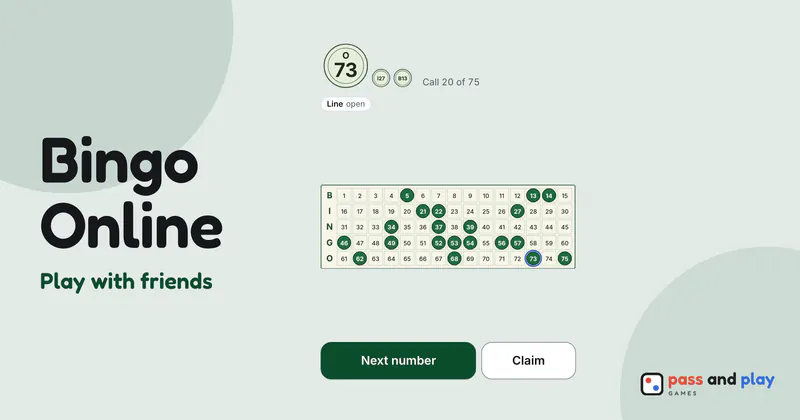
The caller sees the big number with its letter, the two calls before it, and the board of all 75. With When I tap, they call each number with Next number, at the pace of the slowest player. With an interval, the calls come on their own, keep coming while the caller’s phone sleeps, and stop with Pause until Resume. On the caller’s phone the voice reads each call, “B. Seven.”; on the other phones it starts off, and anyone can turn it on.
When the room has extra cards, the caller claims for them by card number and prints them from the menu. A teacher can project the board for a classroom and give printed cards to the students who have no device, while the others play on their own.
The player’s side
On a player’s phone, their card fills the screen under the number just called. Tapping a number marks it, and the marks live on that phone only. They are a help and nothing more: a claim is checked against the numbers called, whatever is marked. The board of called numbers is folded away below the card, ready for anyone who missed one.
Each pattern being played has its own button under the card. Tap it when your card is complete. The answer appears on your phone with your card and its called numbers: Bingo!, a share of the win, or Not yet with the numbers still to come. The rest of the room sees a short notice of who claimed. After a Not yet that button stays off for your card, and the game goes on.
Each phone claims only for its own card. If two cards finish on the same number, both win and share it.
Late arrivals and the end of a game
A student who joins late, or a cousin who wakes up after Start, watches the game in progress: the board and the claims, without a card. In the next game they get one. Anyone who leaves is out of that game, and the others carry on.
When the last pattern is won, no more numbers are called, and 20 seconds later the game ends by itself. A second card that finished on the same number can still claim in that time and share the win. A new game in the room gives everyone a new card; a room with printed extra cards keeps its sheet instead, so the printed ones stay good and every player keeps their card.
Tips for a bingo room
- Use the kids’ range for young children: every card holds every number from 1 to 25, so each call is good news for all of them.
- Line, then Blackout keeps a big room playing after the first winner.
- Call by tap for a class, so you can wait for everyone before the next number.
- Keep your video call open next to the room if you want to see everyone’s faces when a Bingo comes in.
The bingo rules cover the card, each pattern and wrong claims, and the guide to hosting a bingo game has more on classes and big groups. Playing in one room with printed cards and a single phone? Play Bingo on one phone instead.
Rooms are private and close by themselves after the game; the server keeps a room’s names and moves only while it is open. See the privacy policy for the details.